
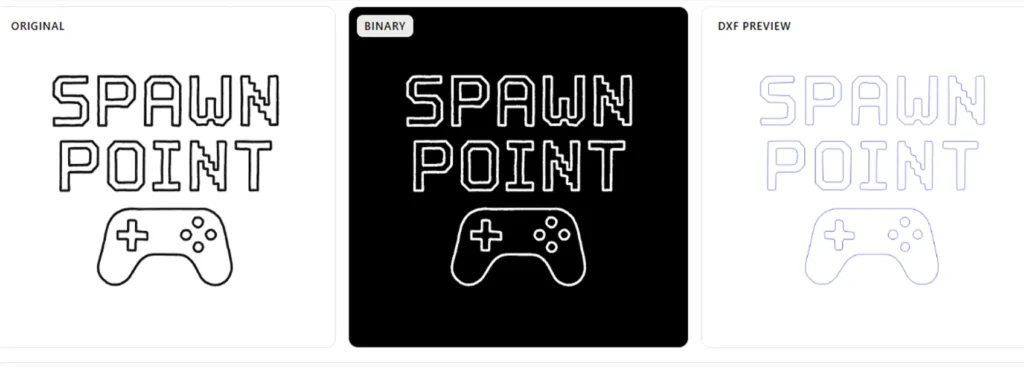
Convert Any Image into Clean CNC DXF Files - Single-Line, Centerline-Ready
Convert images into clean, single-line CNC DXF files ready for laser engraving, plotting, and CNC cutting. True centerline output, live preview, and no messy double lines. Upload your image and try it free.
How It Works
Turning your image into a clean CNC DXF file takes four quick steps:
- Upload your PNG, JPG, or SVG file.
- Adjust the threshold slider to match your artwork.
- Check the live preview to see the single-line result.
- Download your DXF — ready for your laser, CNC, or plotter.
That’s it. No signup, no software, no waiting.
What Are CNC DXF Files?
CNC DXF files are vector drawings that tell your CNC machine, laser cutter, or plotter where to move. Every line, arc, and curve in the file becomes a tool path.
The cleaner your DXF, the cleaner your cut. That’s why single-line output matters so much for engraving and plotting work.
The Problem with Double Lines
Most image-to-DXF converters just trace outlines – so every stroke in your artwork becomes two parallel lines. That causes real problems:
- Your laser burns the same spot twice, leaving dark or melted edges.
- Your CNC router doubles the job time for no reason.
- Your pen plotter draws ghosted, messy lines.
- You waste hours cleaning up the file in CAD software.
A true single line DXF fixes all of this. One path per stroke, one pass per line, clean results every time.
The Single-Line DXF Solution
Our converter uses a real centerline algorithm. It finds the middle of every stroke in your image and extracts it as one clean path – no outlines, no duplicates.
Works great for:
- Logos and typography
- Hand-drawn artwork
- Scanned sketches
- Signatures and line art
You get a centerline DXF that runs cleanly on the first try.
Who It's For
- Laser engraving — clean single-pass engraving on wood, acrylic, leather, and metal
- CNC routing — sharp V-carved signs and text
- Pen plotters — single-stroke output for AxiDraw, iDraw, and DIY builds
- Sign making — production-ready cut files for vinyl and laser
- Jewelry engraving — fiber laser-ready single-line paths
If your machine reads DXF, this tool works for you.
About Accuracy - An Honest Note
We’ll be upfront: centerline extraction is hard. Our tool gets you very close to perfect on most images, and for roughly 9 out of 10 files the DXF is ready to run as-is.
For tricky images, you may need a small touch-up:
- Complex line crossings might need a quick reconnect
- Very thin or broken strokes may need cleanup
- Noisy scans work best after a light pre-edit
That’s why we built the live preview and threshold slider — so you can catch anything before exporting. For the rare file that needs adjustment, two minutes in Inkscape or LightBurn finishes the job. Still faster than tracing by hand.
Why This Tool Is Different
Most online converters are just autotracers that give you outlines. This one is built specifically for CNC, laser, and plotter output:
- True centerline output, not shape outlining
- Live preview with threshold control
- Works directly in your browser
- No watermark, no signup, no limits
- Free to use
If you’ve ever spent an hour fixing a traced DXF, you’ll notice the difference in 30 seconds.
Works With Every Major Platform
Laser: LightBurn, Glowforge, xTool, LaserGRBL, Epilog, Trotec CNC: Fusion 360, Mach3, GRBL, VCarve, Carbide Create Vector editors: Inkscape, Illustrator, CorelDRAW Plotters: AxiDraw, iDraw, Cricut, Silhouette
If your software opens DXF, this file works.
FAQ
es. Upload, preview, and download at no cost.
PNG, JPG, and SVG up to 20 MB. High-contrast images give the best results.
Yes. It’s standard DXF and opens in every major CNC, laser, and plotter software.
nkscape outlines shapes (double lines). This tool extracts true centerlines (single lines) – what your machine actually needs.
Yes. The DXF files you create are yours to use however you want.
Ready to Convert?
Stop fighting with double-lined exports. Get clean single-line CNC DXF files in one click — built for makers, engravers, and CNC users.
Scroll up, upload your image, and try it free.